

How To Create Website For Free Without Coding Knowledgee With Free Domain & Hosting
Building a professional dynamic website is now easier than ever. With the help of AI tools and modern code editors, you can create a complete PHP & MySQL website even if you don’t have deep coding knowledge. In this tutorial, I’ll guide you through the exact process I personally use to build modern web applications and websites. If you have already watched my full YouTube tutorial, then this article will help you with all the important resources and tools required to build your own website successfully.

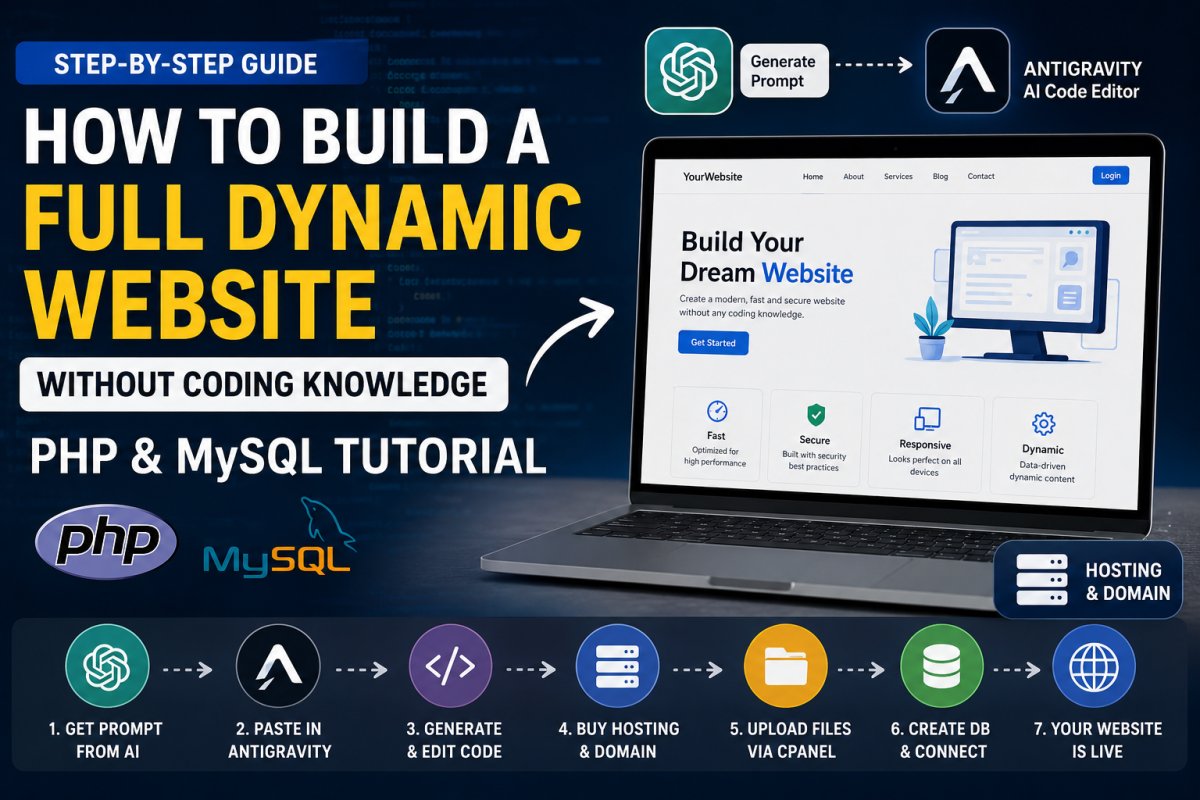
Watch the Full Tutorial First
I have already explained the complete process step-by-step on my YouTube channel. Make sure you watch the full video before starting because it will help you understand the workflow more clearly.
In the tutorial, I explained:
- How to generate website ideas using AI
- How to create professional prompts
- How to generate website code
- How to edit and fix errors
- How to upload the website on hosting
- How to connect the database
- How to make the website live
Step 1 — Use AI Chat Tools to Generate Website Ideas
First, you need an AI chatbot like:
- ChatGPT
- Gemini
- Claude
- DeepSeek
These AI tools can help you generate website structures, features, UI ideas, and complete prompts.
Simply describe the type of website you want to build.
Example:
- Grocery Delivery Website
- Food Ordering Website
- Hosting Website
- Portfolio Website
- Blogging Platform
- Automation SaaS Platform
The more details you provide, the better results you will get.
Step 2 — Generate a Professional Prompt
After describing your website idea, ask the AI to generate a professional development prompt for your AI code editor.
Example Prompt
Create a complete dynamic Grocery + Food Delivery Website using PHP 8+, MySQL, HTML5, CSS3, Bootstrap 5, JavaScript, and AJAX.
Project structure should be fully modular, secure, CMS-style, and production-ready.

Website Name Example:
QuickMart / GroceryGo

IMPORTANT REQUIREMENTS:
- Use Core PHP (No Laravel)
- Use MySQL database
- Use PDO prepared statements for security
- Use MVC-like clean folder structure
- Fully dynamic CMS-style admin panel
- Mobile responsive modern UI
- SEO-friendly URLs
- Secure authentication system
- Admin can manage all homepage sections dynamically
- Separate Grocery and Food systems
- Clean coding standard
- Commented code
- Dynamic image upload system
- AJAX form submission where needed
- CSRF protection
- SQL Injection protection
- XSS filtering
- Session-based secure login

========================================
FOLDER STRUCTURE
========================================

/project-root
│
├── /admin
│   ├── /assets
│   ├── /includes
│   ├── /modules
│   ├── dashboard.php
│   ├── login.php
│   ├── logout.php
│
├── /assets
│   ├── /css
│   ├── /js
│   ├── /images
│   ├── /uploads
│
├── /config
│   ├── config.php
│   ├── database.php
│
├── /includes
│   ├── header.php
│   ├── footer.php
│   ├── functions.php
│
├── /pages
│   ├── grocery.php
│   ├── food.php
│   ├── category.php
│   ├── product.php
│
├── /api
│
├── index.php
├── .htaccess
└── database.sql

========================================
FRONTEND FEATURES
========================================

Homepage should contain:
- Hero Banner
- Grocery / Food Toggle Buttons
- Dynamic Categories
- Featured Products
- Popular Food Items
- Offers Section
- Delivery Information
- Testimonials
- App Download Section
- Footer CMS Content

TOGGLE SYSTEM:
- Two toggle buttons:
  1. Grocery
  2. Food

When Grocery toggle active:
- Show only Grocery Categories
- Show Grocery Products

When Food toggle active:
- Show only Food Categories
- Show Food Products

========================================
CATEGORY SYSTEM
========================================

Admin can:
- Add Grocery Categories
- Add Food Categories
- Upload category image
- Set category status
- Edit/Delete category

Category fields:
- id
- category_name
- category_type (food/grocery)
- slug
- image
- status
- created_at

========================================
PRODUCT SYSTEM
========================================

Admin can:
- Add Products
- Select category
- Auto detect toggle type from category
- Upload multiple images
- Set pricing
- Offer price
- Stock status
- Description
- Featured product option

Product fields:
- id
- category_id
- product_name
- slug
- description
- price
- offer_price
- image
- product_type (food/grocery)
- featured
- status
- created_at

IMPORTANT:
If product category is Grocery:
→ Product should only appear in Grocery toggle

If product category is Food:
→ Product should only appear in Food toggle

========================================
ADMIN PANEL FEATURES
========================================

Default Login:
Email: admin@admin.com
Password: admin1234

Admin Panel Features:
- Dashboard
- Homepage CMS
- Manage Categories
- Manage Products
- Manage Orders
- Manage Users
- Manage Offers
- Manage Testimonials
- Site Settings
- Banner Management
- Delivery Charges Settings
- Contact Details
- Logo/Favicon Upload
- SEO Settings

========================================
HOMEPAGE CMS SYSTEM
========================================

Admin should be able to:
- Edit Hero Title
- Edit Hero Description
- Change Hero Image
- Edit Offer Section
- Change Homepage Banners
- Edit Delivery Section
- Edit Footer Content

All homepage sections must be dynamic from database.

========================================
DATABASE REQUIREMENTS
========================================

Create complete MySQL database.sql file with:
- users table
- categories table
- products table
- homepage_sections table
- banners table
- settings table
- orders table
- testimonials table

Insert default admin login:
admin@admin.com
password: admin1234

Password must be hashed.

========================================
UI DESIGN
========================================

Design should look:
- Modern
- Professional
- Fast
- Swiggy + Blinkit inspired
- Clean cards
- Smooth animations
- Mobile responsive
- Sticky navbar
- Floating cart button
- Toggle animation

Use:
- Bootstrap 5
- FontAwesome Icons
- Swiper Slider

========================================
EXTRA FEATURES
========================================

- Search functionality
- AJAX category filtering
- Product quick view popup
- Add to cart system
- Session cart
- Checkout page
- Order success page
- WhatsApp order support
- Coupon system
- Dark/light mode optional

========================================
SECURITY
========================================

Must implement:
- PDO Prepared Statements
- CSRF Token
- Session Security
- Login Validation
- File Upload Validation
- SQL Injection Protection
- XSS Protection

========================================
OUTPUT REQUIRED
========================================

Generate:
1. Full Project Files
2. Complete Database.sql
3. Admin Panel
4. Responsive Frontend
5. Dynamic CMS System
6. Clean Folder Structure
7. Installation Guide
8. .htaccess SEO URL Rewrite
9. Sample Dummy Data

Project should run directly on XAMPP/LAMP server.
Use professional coding standards.
No dummy incomplete code.
Everything should be fully functional.
Step 3 — Use an AI Code Editor
After getting your prompt, you need to use an AI-powered code editor.
Nowadays many AI code editors are available, but one of the best free options is:
Antigravity AI Code Editor
It is available for:
- Windows
- macOS
- Linux
Inside the editor:
- Paste your generated prompt
- Select any AI model
- Keep “Plans Mode” enabled
Keeping Plans Mode enabled is important because it helps the AI editor remember your project structure, previous updates, and error fixes. This makes future development much easier and smarter.
Step 4 — Generate and Customize Your Website
Once the AI starts generating the project:
- Check the UI design
- Update colors and branding
- Add your logo
- Customize sections
- Fix errors if needed
- Improve responsiveness
You can continue improving your project step-by-step using AI assistance.
Step 5 — Buy Hosting & Domain
After your website is ready, you need hosting and a domain name to make it live online.
You can get affordable hosting and domains from Hostyindia.
Free Trial Offer
Use Promo Code:
TRYFIRST
to get a 1-month free trial.
Step 6 — Upload Website in cPanel
After purchasing hosting:
- Login to cPanel
- Open File Manager
- Go to
public_html - Upload your source code ZIP file
- Extract the ZIP file
Step 7 — Create and Connect Database
Now create your MySQL database:
- Create Database
- Create Database User
- Assign User to Database
- Import SQL File
- Update Database Credentials
Finally, connect the database with your PHP project.
I already explained this complete process inside the video tutorial, so watch it carefully for better understanding.
Why AI Website Development is the Future
AI-powered development is helping beginners create professional applications faster than ever.
Benefits include:
- Faster development
- Less coding knowledge required
- Better UI generation
- Automatic error fixing
- Rapid prototyping
- Easy customization
This is one of the best ways to learn modern web development in 2026.
Final Words
I hope this tutorial helps you build your own dynamic website successfully using PHP & MySQL with AI tools.
If you enjoy this type of content:
- Follow the blog
- Subscribe to the YouTube channel
- Share this article with friends
More tutorials related to:
- Web Development
- Hosting Business
- WHMCS Customization
- Automation
- Blogging
- Online Earning
- AI Development
will be uploaded regularly on Blog.Saurabh.
What's Your Reaction?
 Like
3
Like
3
 Dislike
0
Dislike
0
 Love
0
Love
0
 Funny
0
Funny
0
 Wow
0
Wow
0
 Sad
0
Sad
0
 Angry
0
Angry
0




Comments (0)